
Installing the Mac service
ecran-agent is a small service that runs in your user session: it connects to the screen, describes your keys to it, and carries out your presses. One binary, one config file, one command.
Every command is typed in your Mac's Terminal, under your own account: nothing needs sudo. In the examples, the screen's address is 192.168.1.50, and your home folder is /Users/me.
1Download and verify
Apple silicon or Intel? This command answers arm64 for the first, x86_64 for the second:
uname -mFetch the matching binary and the checksum file, then check one against the other.
curl -fLO https://marquee.yg-devworks.com/telechargements/v1.0.0/ecran-agent-darwin-arm64
curl -fLO https://marquee.yg-devworks.com/telechargements/v1.0.0/SHA256SUMS
shasum -a 256 -c SHA256SUMS --ignore-missingcurl -fLO https://marquee.yg-devworks.com/telechargements/v1.0.0/ecran-agent-darwin-amd64
curl -fLO https://marquee.yg-devworks.com/telechargements/v1.0.0/SHA256SUMS
shasum -a 256 -c SHA256SUMS --ignore-missingThe last command must answer ecran-agent-darwin-arm64: OK (or amd64). If it says anything else, stop right there: the file isn't the one that was published.
2Install the binary
Install it where it's going to stay: the service will remember this path.
mkdir -p ~/bin
install -m 755 ecran-agent-darwin-arm64 ~/bin/ecran-agentmkdir -p ~/bin
install -m 755 ecran-agent-darwin-amd64 ~/bin/ecran-agent3The quarantine
Downloaded with curl, as above, the binary isn't quarantined: skip to the next step.
Downloaded with a browser, it is: macOS flags the file, and refuses to run a program that isn't signed with a Developer ID, which is the case of ecran-agent. Once the checksum is verified, remove the flag:
xattr -d com.apple.quarantine ~/bin/ecran-agentThe flag follows the file when install copies it: that's why you remove it from ~/bin/ecran-agent. On a file that doesn't carry it, the command answers No such xattr: nothing to worry about.
4The config
The config lives in ~/Library/Application Support/ecran-agent/config.json, with permissions 600: readable by you alone. The token is in it; if anyone else can read it, the service refuses to start, just like ssh.
mkdir -p ~/Library/Application\ Support/ecran-agent
touch ~/Library/Application\ Support/ecran-agent/config.json
chmod 600 ~/Library/Application\ Support/ecran-agent/config.json
Then, in your code editor, write into it:
{
  "ecran": "192.168.1.50:8098",
  "machine": "MacBook Pro",
  "jeton": "<the same as in JETONS_MACHINES>",
  "touches": [
    { "id": "terminal", "libelle": "Terminal", "application": "com.apple.Terminal" }
  ]
}ecran- The host machine's address, and port
8098. machine- This Mac's name, exactly as it appears in
JETONS_MACHINESon the screen. jeton- The token you generated in the Installing the screen chapter, the same on both sides.
touches- Your keys: a first one here, all the others in the Creating your keys chapter.
The file is reread as soon as it changes. A typo in a field name is an error, not a field quietly ignored: the service then keeps the previous config, and the screen shows the error.
5The background service
~/bin/ecran-agent installerIt writes ~/Library/LaunchAgents/com.yg-devworks.ecran-agent.plist and loads it: the service starts straight away, then every time you log in, and comes back if it falls over. The LaunchAgent picks up your login shell's PATH: without it, launchd only hands out a minimal one, and a command installed with Homebrew would be nowhere to be found. The command answers:
installé : /Users/me/Library/LaunchAgents/com.yg-devworks.ecran-agent.plist — journal : /Users/me/Library/Logs/ecran-agent.log6The “Local Network” prompt
Started by launchd, the service doesn't inherit Terminal's permissions. On its first launch, macOS asks whether it may access the local network, and keeps refusing it until you click Allow.
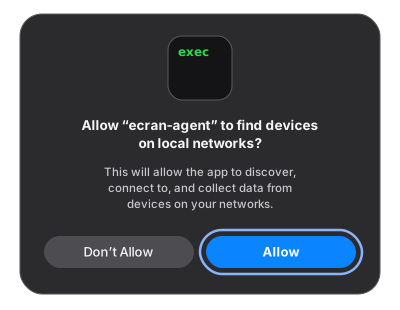
Missed the dialog, or said no? It can all be put right in System Settings → Privacy & Security → Local Network, by switching on ecran-agent.
Until you do, the log keeps repeating no route to host, even though the screen answers from Terminal:
nc -vz 192.168.1.50 8098If this command says succeeded!, it isn't the network: it's the permission. Observed on the first deployment, on 2026-09-25: after the binary was replaced, one refused attempt, then a reconnection a second later, with no new prompt.
7The log
tail -f ~/Library/Logs/ecran-agent.logOnce connected, it writes a line like this one, and the Keys page appears on the screen:
2026/09/25 21:42:03 écran 192.168.1.50:8098 : connecté comme "MacBook Pro"Every change to config.json leaves a config relue : 3 touches (config reread: 3 keys) there, or the error that got it rejected.
Don't run ecran-agent by hand while the service is running. Two instances under the same name keep replacing each other on the screen, endlessly: each connection closes the previous one, which comes back a second later. To try it by hand, stop the service first (see Uninstalling, first command).
8Updating
Download and verify the new version as in step 1, install it as in step 2: install replaces the old binary. Then restart the service, so it picks up the new one:
launchctl kickstart -k gui/$(id -u)/com.yg-devworks.ecran-agent9Uninstalling
Stop the service, then remove it along with the binary:
launchctl bootout gui/$(id -u) ~/Library/LaunchAgents/com.yg-devworks.ecran-agent.plist
rm ~/Library/LaunchAgents/com.yg-devworks.ecran-agent.plist ~/bin/ecran-agent
The config and the log stay where they are. To delete them too:
rm -r ~/Library/Application\ Support/ecran-agent ~/Library/Logs/ecran-agent.logOn the screen, remove this Mac from JETONS_MACHINES and restart the service: its token is now worth nothing.