
Hardware
A bar display, a small Linux machine to drive it, Music Assistant, and a Mac for the keys. Here is what has been tested, and what hasn't been yet: this guide only promises what has worked.
At a glance
| What | The reference | Status |
|---|---|---|
| The screen | 12.3-inch bar display, 1920 × 720, RTD controller, HDMI input, USB touch | tested |
| The host machine | x86 mini PC (amd64) running Debian 13 | tested |
| Raspberry Pi (arm64) running Debian 13 | not yet tested | |
| Music Assistant | Version 2.10 or later, on the host machine | tested |
| A Mac | Apple silicon (arm64), macOS 26 | tested |
| Intel Mac (amd64) | not yet tested | |
| gproj | For the Projects page | optional |
The screen
The reference screen is a 12.3-inch bar display, 1920 × 720 pixels, with an RTD controller, an HDMI input and a touch panel that runs over USB, as HID (checked on 2026-09-25). It needs no driver: to Linux, it's an ordinary display and an ordinary touch device.
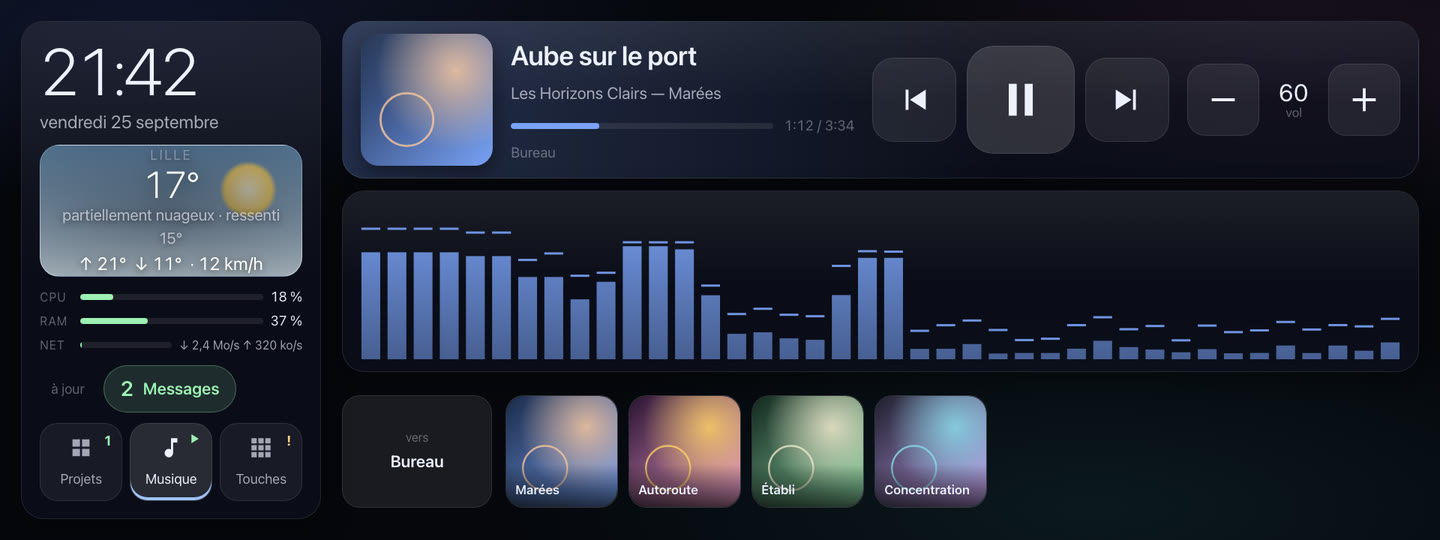
Marquee is laid out for this exact format. Everything you press is at least 96 pixels, for fingers, and everything read from a distance stays big. No other size or resolution has been tried.
- The picture. On the reference machine, the screen is plugged into a DisplayPort output: since its input is HDMI, that calls for a DisplayPort-to-HDMI cable.
- Touch. A USB cable from the screen to the host machine. Under labwc, the compositor the next chapter installs, it works with no setup at all.
The host machine
This is the machine that runs Marquee and shows its page, full screen. It needs Debian 13.
- An x86 mini PC (amd64): the reference setup, the tested one.
- A Raspberry Pi (arm64): an arm64 binary exists, and it builds, but it hasn't been tested on a Raspberry Pi yet. If you try it, you'll be the first.
It hosts Music Assistant too. Marquee queries it locally, on the same machine: that's the setup it's made for. The service steps aside for the music, at low priority, so it never gets in the audio server's way.
For the display, it runs a graphical environment cut down to the bare minimum: the labwc Wayland compositor, Chromium, and greetd, which opens the session at boot. The Installing the screen chapter installs them.
Music Assistant
You need Music Assistant 2.10 or later, installed on the host machine. Marquee reads what's playing from it and controls it: play and pause, previous and next track, volume, and starting your favorites on the speaker of your choice.
Since 2.10, Music Assistant refuses any anonymous access: Marquee needs a token. You'll create it in the Installing the screen chapter. Without it, the screen shows “aucun jeton” (no token) rather than pretending nothing is playing.
The spectrum plugs into Music Assistant's MilkDrop visualization relay. If that's missing, the screen says “visualiseur absent” (no visualizer), and everything else works.
A Mac
For the keys, you need a Mac on the same local network as the screen, with a recent macOS. It runs ecran-agent, a small service in your user session.
- Apple silicon (arm64): tested, on macOS 26.
- Intel (amd64): builds, not yet tested.
Several Macs can connect, each with its own token. And with no Mac at all, Marquee still works: the time, the weather, the music. The Keys page only appears once a machine is known.
The local network
- A fixed address for the host machine. The Mac connects to it by its address, for example
192.168.1.50: reserve it in your router. - Two ports. Macs connect on TCP port
8098; the page is served on port8099, where gproj also pushes its state. If the host machine filters incoming traffic, open them to your Macs. - Internet access, for the weather: it comes from Open-Meteo, with no key and no account.
Seen from another device on the network, the page is readable, but its keys stay inert: Marquee only takes commands from the screen itself.
What's optional
- gproj, for the Projects page: the session tool of Marquee's author, which isn't distributed, pushes the state of its work sessions to the screen. The real contract is
POST /etat, which any tool can call: it's all in the Projects chapter. - The Mac, if all you want is the music, the time and the weather.