
Music
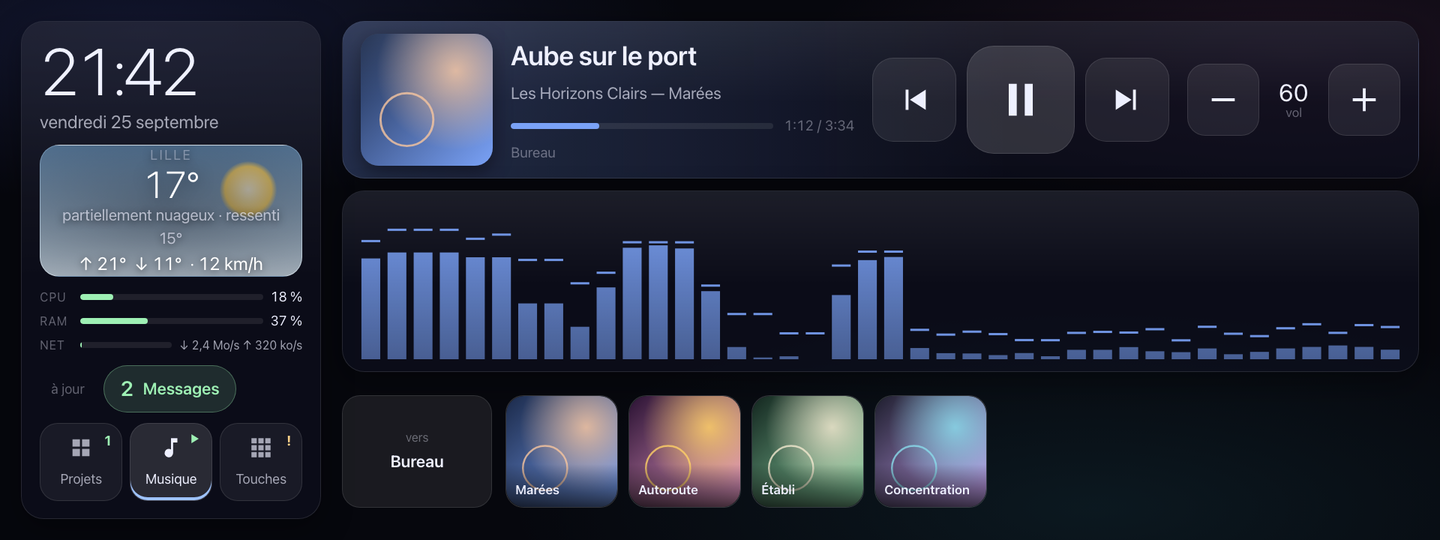
Marquee plays Music Assistant locally, and lets you control it: play, previous, next, volume, favorites, speaker, and three ways to see the sound.
Favorites
A heart set in Music Assistant, on an album, a track or a radio station, becomes a key here: its cover art when Music Assistant gives one that's publicly reachable, otherwise its name alone. Reread at most once a minute, grouped by type — albums, playlists, radio stations, artists, tracks — then sorted by name within each group.
With no favorites, the row says “aucun favori” (no favorites); with no Music Assistant token, it doesn't show at all, like the rest of the music.
Speakers
Tapping a favorite starts it on the speaker shown at the head of the row: touch it to pick another one. By default, it's whichever one is already playing, otherwise the last one you looked at, otherwise the first one available.
Your Mac's audio companion stays hidden from this list, except when Music Assistant is playing through it, or was the last one it played through: otherwise, your favorites would become unusable the moment the other speakers are switched off.
The three visualizations
Below the cover art, a band draws what the speaker is playing, wired into Music Assistant's visualization relay. Three ways to read it:
- Spectrum
- Bass on the left, treble on the right: the most detailed shape.
- Bar graph
- The level in segments across the full width, with a peak that falls back.
- Needle
- A VU-meter dial, like on a mixing desk.
Each one reads in two colour modes: monochrome in the cover art's own hue, or green, yellow and red by level.
The gesture
- Swipe sideways
- Moves from one visualization to the next, like turning a page: swipe left for the next one.
- A long press
- Switches between the two colour modes. A finger that slides doesn't count as a long press: the movement cancels it.
The setting's name appears briefly on every change, to confirm what was just chosen.
Remembered by the browser
The visualization and colour mode you choose stay this browser's: the screen's own, not some passing visitor's on the network. They survive a page reload. If the browser refuses this storage, the choice falls back to the spectrum in cover-art hue on every opening: a lost convenience, not a failure.